OSS-RTK – Open Survey System RTK
OSS-RTK (Open Survey System RTK) - RTK Rover Firmware
ESP32 Firmware for GNSS RTK Rover
This is the main ESP32 firmware for the OSS-RTK (Open Survey System RTK) - an open-source GNSS RTK rover designed for professional surveying and mapping applications. The firmware bridges the GNSS RTK receiver’s UART to iOS/Android devices over BLE (Nordic UART Service, default), Bluetooth Classic SPP (Android only) or a raw WiFi TCP socket. The link and the WiFi settings are chosen in a built-in web UI - see Setup and Web UI.
Project Overview
The Open Survey System RTK Rover consists of three main components:
- GNSS RTK Receiver: Quectel LC29H DA (dual-antenna, multi-band RTK)
- ESP32 MCU: Main controller running this firmware (Wemos D1 Mini32)
- Power Management Module: Battery management and power distribution
This firmware handles:
- ✅ Real-time NMEA/RTCM data streaming via BLE Nordic UART Service (NUS), Bluetooth Classic SPP or WiFi TCP
- ✅ Bidirectional communication (corrections from mobile → GNSS)
- ✅ Web UI for choosing the link and configuring WiFi (AP / Station / AP + Station)
- ✅ Over-The-Air (OTA) updates of firmware and web UI via WiFi
- ✅ Status LED indication
Setup and Web UI
How the rover starts
WiFi and Bluetooth share a single radio and most of the ESP32’s memory, so the rover never runs them together:
- Power-on → setup window. Only WiFi is up, with the web UI, OTA and Telnet. The LED gives a short flash once per second.
- Nobody opens the web UI within the window (30 s by default) → WiFi switches off and the Bluetooth link starts. No restart needed.
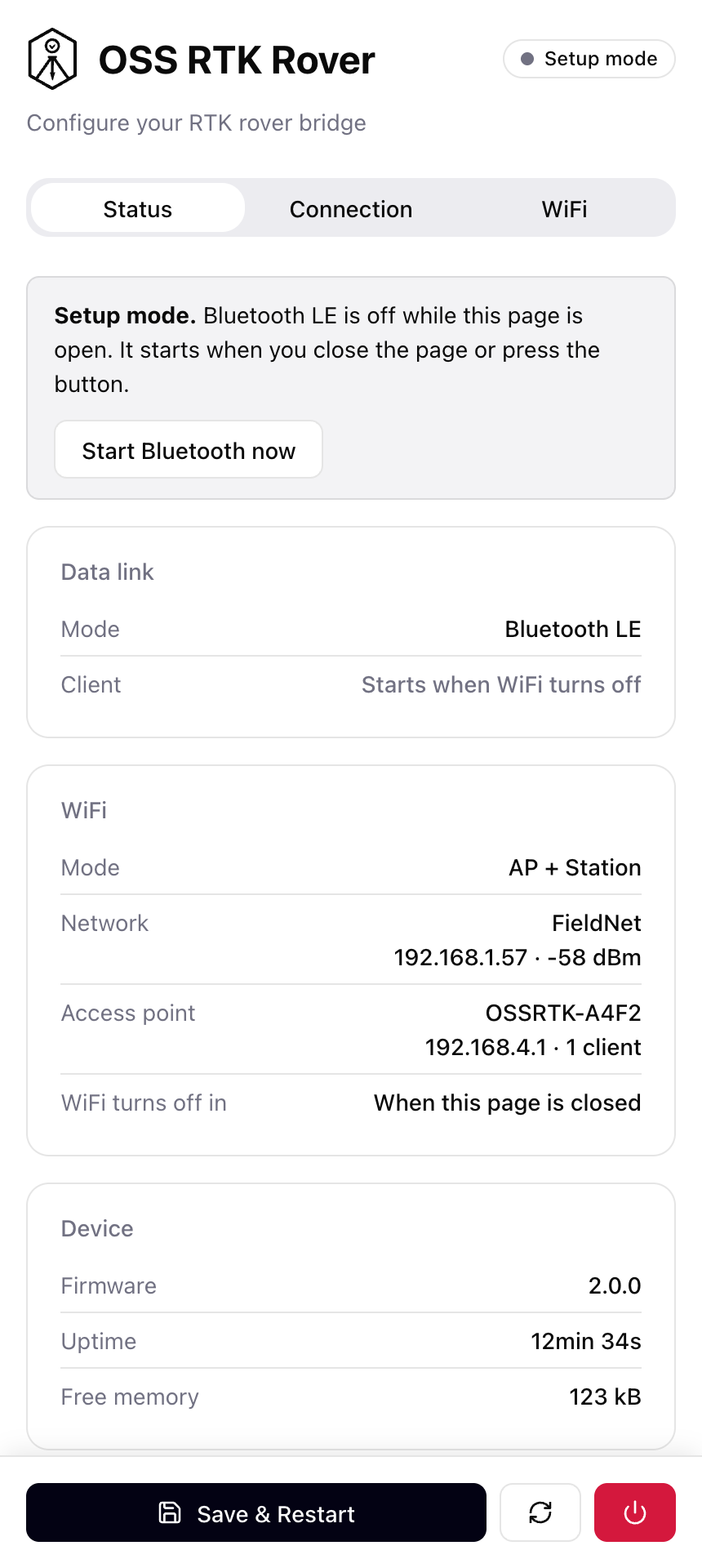
- Someone is using the web UI → the rover stays in setup mode. Close the page or press Start Bluetooth now to finish.
Only real use keeps WiFi on: an open and recently used web UI page, an OTA transfer or a Telnet session. A phone that merely joins the rover’s WiFi does not. To get WiFi back, restart the rover.
With the WiFi (TCP) link there is no Bluetooth: WiFi stays on and the data link is available right after boot.
Reaching the web UI
- On your network:
http://ossrtk.local(or the rover’s IP address) - On the rover’s own access point
OSSRTK-XXXX:http://192.168.4.1
The UI has three tabs:
| Tab | What it does |
|---|---|
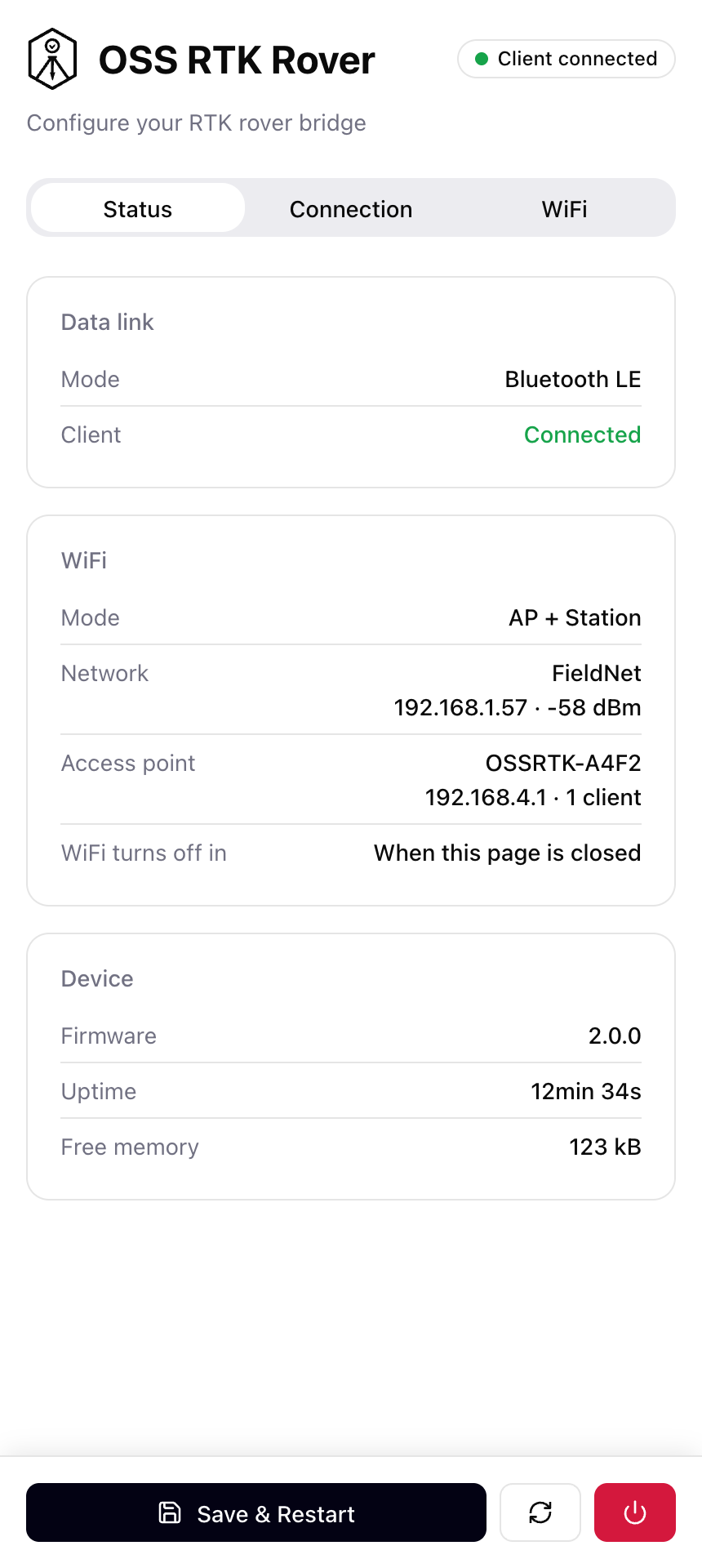
| Status | Active link, client connection, WiFi addresses, time left in the setup window, firmware, heap |
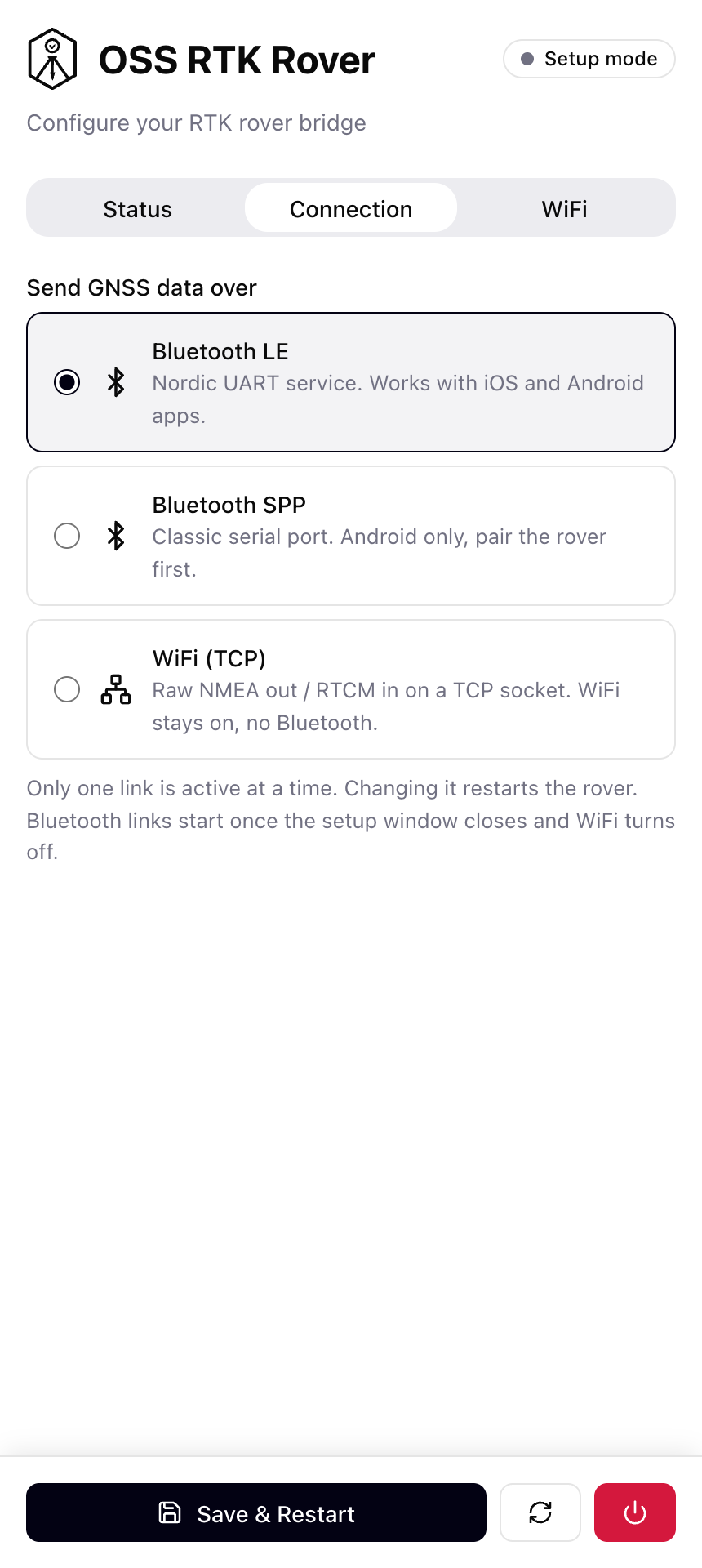
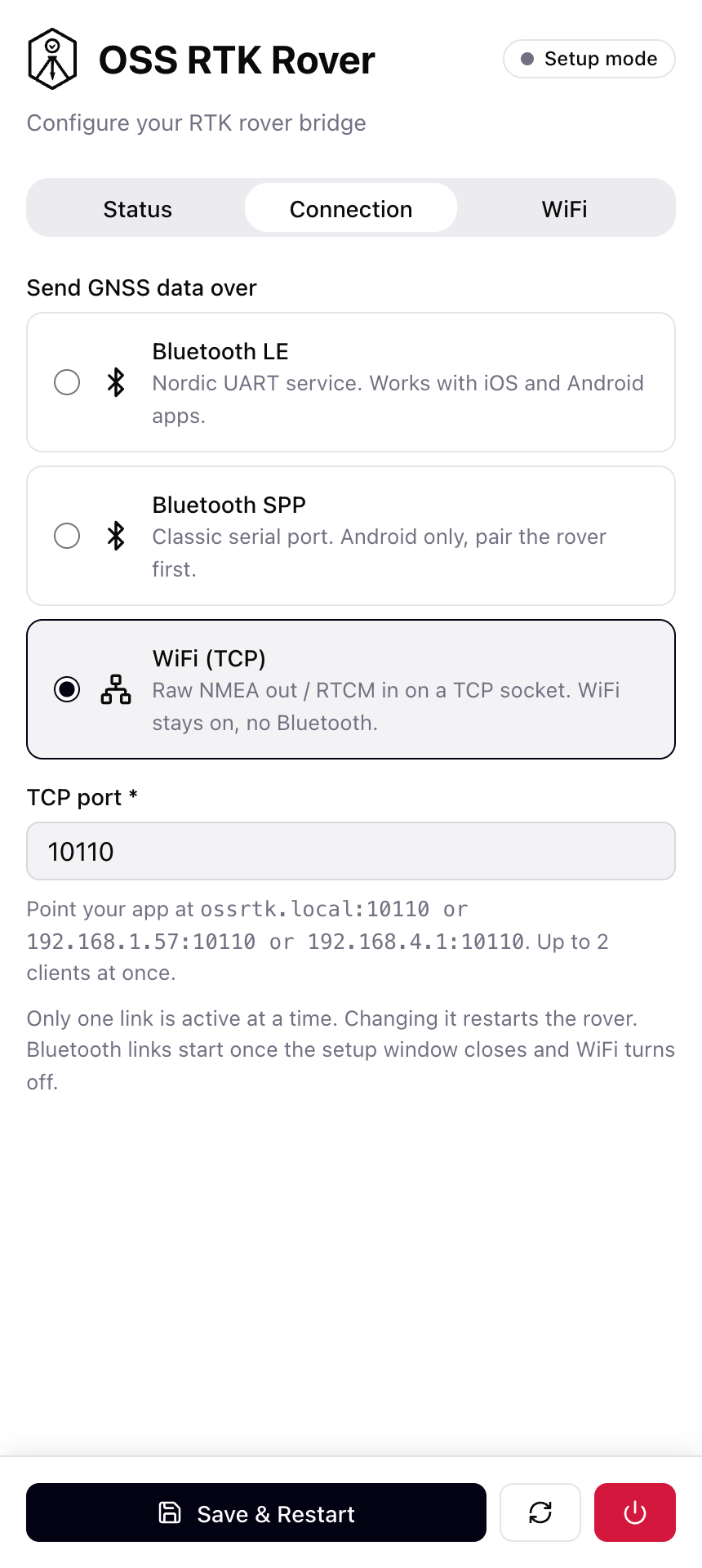
| Connection | Choose Bluetooth LE, Bluetooth SPP or WiFi (TCP) and the TCP port |
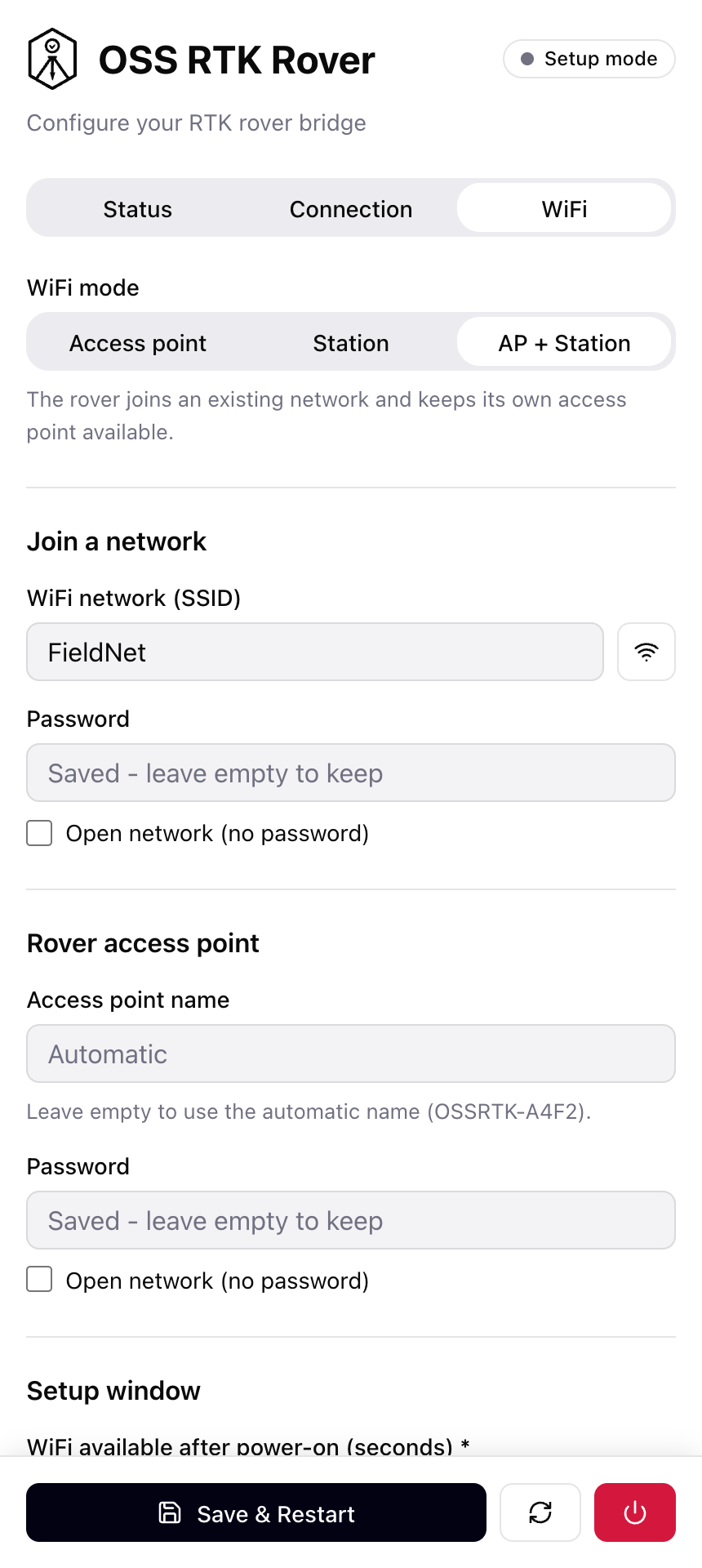
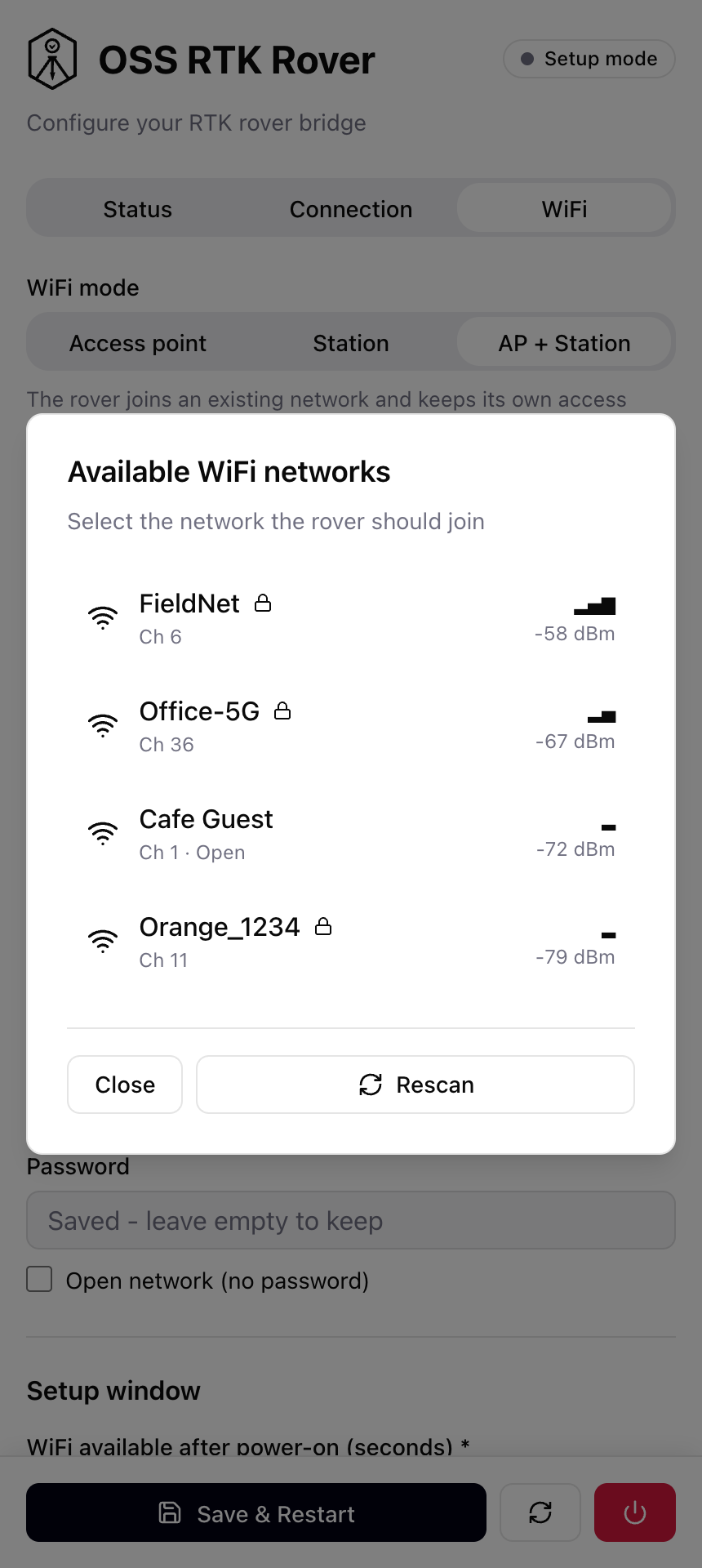
| WiFi | Access point / Station / AP + Station, network scan, credentials, setup window length |
Save & Restart stores the settings in flash (NVS) and reboots the rover.
Screenshots
The web UI is a single responsive page, designed for a phone screen.
Status - during the setup window (Bluetooth waits until the page is closed or Start Bluetooth now is pressed) and once a client has connected:
 |
 |
Connection - choose the client link; the TCP port and the addresses to point your app at appear for the WiFi (TCP) link:
 |
 |
WiFi - mode, network credentials, the rover’s own access point and the setup window length; the scan button lists nearby networks:
 |
 |
Client links
| Link | iOS | Android | Notes |
|---|---|---|---|
| Bluetooth LE (default) | ✅ | ✅ | Nordic UART Service, 185B MTU |
| Bluetooth SPP | ❌ | ✅ | Plain serial stream, pair with OSSRTK first |
| WiFi (TCP) | ✅ | ✅ | ossrtk.local:10110 by default, up to 2 clients, WiFi stays on |
⚠️ iOS cannot use SPP. Bluetooth Classic SPP is not available to third-party iOS apps without MFi certification.
WiFi modes
| Mode | Behavior |
|---|---|
| Access point | The rover creates its own network OSSRTK-XXXX (open unless you set a password) |
| Station | The rover joins your network |
| AP + Station (default) | Both at once |
If the rover cannot join the configured network within 10 seconds, it falls back to its own access point so the web UI stays reachable.
⚠️ The web UI has no login and the default access point is open. Set an access point password before using the rover around other people.
Adding a new link means implementing ITransport (see src/transport.h) and adding a branch to src/transport_factory.cpp.
GNSS module settings (GNSS tab)
The GNSS tab configures the LC29H itself with $PQTM / $PAIR commands (Quectel LC29H Series & LC79H (AL) GNSS Protocol Specification V1.4). Settings are saved in the module’s own memory ($PQTMSAVEPAR), not in the rover. The form always shows what the module reports, and fields the module does not answer for are hidden.
| Setting | Command | Notes |
|---|---|---|
| Receiver mode | $PQTMCFGRCVRMODE |
Rover / base. Base mode turns NMEA off. Applies after reboot |
| Constellations | $PQTMCFGCNST |
Only the combinations the RTK variants accept. Applies after reboot |
| Position rate | $PQTMCFGFIXRATE |
1/2/5/10 Hz on BA (and EA). Editable on DA for testing only (datasheet: 1 Hz). Applies after reboot |
| Dynamic model | $PAIR080 |
Normal, pedestrian, stationary, drone, bike |
| SBAS | $PAIR410 |
Fallback accuracy without RTK |
| NMEA output | $PQTMCFGMSGRATE |
GGA, RMC, GSA, GSV, VTG, GLL (+ GST, ZDA where supported) |
| Hot / warm / cold start | $PAIR004 / 005 / 006 |
|
| Factory settings | $PQTMRESTOREPAR |
Applies after reboot |
| Reboot module | $PAIR023 |
Not in the protocol spec, documented by Quectel support. If saved settings still do not show up, power-cycle the rover |
The tab works whenever the web UI does: during the setup window, or all the time with the WiFi (TCP) link. While a command runs (about 1-2 s), the rover pauses the GNSS ↔ TCP bridge. The baud rate stays fixed at 115200.
Hardware Components
UART Pinout (ESP32 ↔ LC29H DA)
LC29H DA (GNSS)     ESP32 (Wemos D1 Mini32)
---------------     -----------------------
VCC_IN (3.3-5V) --> 3.3V (via power module)
GND             --> GND
UART1_TX        --> GPIO25 (RX - GNSS data to ESP32)
UART1_RX        <-- GPIO27 (TX - corrections to GNSS)
UART Configuration:
- Baud Rate: 115200
- Data: 8N1 (8 bits, no parity, 1 stop bit)
- Flow Control: None
Power Saving
WiFi setup window
- WiFi is only on during the setup window after power-on (30 s by default, 15-600 s in the web UI), then it is switched off
- With the WiFi (TCP) link WiFi stays on permanently and the rover draws correspondingly more
Bluetooth low power mode
- TX Power: -9dBm (
BLE_TX_POWER/SPP_TX_POWER) - Range: ~10-15m (sufficient for rover-to-mobile)
- Bluetooth Classic (SPP) draws noticeably more than BLE
Current draw has not been re-measured for this firmware revision.
Mobile App Compatibility
Recommended iOS Apps (Bluetooth LE or WiFi TCP link)
- Lefebure NTRIP Client - Professional RTK/NTRIP app
- SW Maps - Survey and mapping with NTRIP support
- nRF Toolbox (Nordic) - Testing NUS connection
Android Apps (any link)
- Lefebure NTRIP Client
- Mobile Topographer
- Serial Bluetooth Terminal - works with the SPP link (pair first) and with the BLE link in BLE mode
Building and Uploading
Run the commands from the repository root. oss-rover-usb flashes over serial, oss-rover over WiFi - both build the same image.
First Upload (via USB)
# Firmware
pio run -e oss-rover-usb -t upload

# Web UI files (LittleFS)
pio run -e oss-rover-usb -t uploadfs

# Monitor serial output
pio device monitor
A USB flash is also needed when upgrading from a firmware older than 2.0.0, because the partition table changed.
OTA Updates (via WiFi)
pio run -e oss-rover -t upload      # firmware -> ossrtk.local
pio run -e oss-rover -t uploadfs    # web UI
# OTA password: admin (configurable in config.h)
Important: OTA only works during the setup window after power-on.
- Restart the rover
- Open
http://ossrtk.local- an open web UI page keeps WiFi on - Run the upload
- Close the page or press Start Bluetooth now when done
Configuration
Day-to-day settings (client link, TCP port, WiFi mode and credentials, setup window length) are changed in the web UI and stored in flash. include/config.h holds the compile-time parameters and the factory defaults:
UART Settings (GNSS)
#define GPS_RX_PIN 25           // GNSS TX → ESP32 RX
#define GPS_TX_PIN 27           // ESP32 TX → GNSS RX
#define GPS_BAUD_RATE 115200    // LC29H DA baud rate
#define UART_BUF_SIZE 1024      // bridge read chunk per loop pass
#define UART_RX_BUF_SIZE 4096   // UART driver RX buffer (~350ms at 115200)
WiFi/OTA Settings (factory defaults)
#define DEFAULT_TRANSPORT_MODE 0       // 0 = BLE, 1 = Bluetooth SPP, 2 = WiFi TCP
#define DEFAULT_WIFI_MODE 2            // 0 = AP, 1 = STA, 2 = AP+STA
#define DEFAULT_SETUP_WINDOW_SEC 30    // WiFi-only setup window after boot
#define WIFI_SSID "YourNetwork"        // default network to join
#define WIFI_PASSWORD "YourPassword"
#define OTA_HOSTNAME "ossrtk"          // ossrtk.local
#define OTA_PASSWORD "admin"
#define TCP_PORT_DEFAULT 10110         // NMEA-0183 over TCP
Power Saving
#define BLE_TX_POWER ESP_PWR_LVL_N9    // -9dBm (low power, BLE)
#define SPP_TX_POWER ESP_PWR_LVL_N9    // -9dBm (low power, SPP)
Bluetooth Settings
#define BT_DEVICE_NAME "OSSRTK"        // BLE scanner name / BT pairing name

// BLE link only:
#define BLE_MTU_SIZE 185               // MTU offered to the phone (iOS max)
#define BLE_DEFAULT_MTU 23             // until the phone negotiates a larger one
#define BLE_CHUNK_SIZE 180             // max notify size, capped at negotiated MTU - 3
Notifications are sized from the MTU the phone actually negotiated (logged as [BLE] MTU negotiated: ...). A phone that stays at the default 23 gets 20-byte chunks, which is slower but loses nothing.
Status LED
#define LINK_STATUS_LED_PIN 23         // GPIO23 (active HIGH)
#define LINK_LED_BLINK_MS 250          // Blink period when disconnected
Nordic UART Service (NUS) UUIDs
The firmware implements the standard Nordic UART Service for maximum compatibility:
Service UUID:  6E400001-B5A3-F393-E0A9-E50E24DCCA9E
RX Char UUID:  6E400002-B5A3-F393-E0A9-E50E24DCCA9E  (Mobile → ESP32 → GNSS)
TX Char UUID:  6E400003-B5A3-F393-E0A9-E50E24DCCA9E  (GNSS → ESP32 → Mobile)
Debugging and Monitoring
Serial Monitor (USB - 115200 baud)
========================================
OSS RTK Rover 2.0.0
GPS (NMEA) ↔ UART bridge
========================================

[Setup] Transport: BLE, WiFi mode: sta, setup window: 30 s
[WiFi] Connecting to "YourNetwork"...
[WiFi] Setup window: off after 30 s without web UI / OTA / Telnet use
[Web] UI on port 80
[UART] Initialized GPS UART
[UART] RX: GPIO25, TX: GPIO27, Baud: 115200
[Setup] Setup window open: WiFi only, BLE starts when it closes
[OTA] Ready for firmware updates
[Telnet] Server started on port 23
...
[WiFi] Setup window closed - switching WiFi off
[Setup] Initializing BLE...
[BLE] Nordic UART Service started
[BLE] Device name: OSSRTK
Waiting for GPS data and client connection...
The same log is available over Telnet (telnet ossrtk.local) during the setup window.
Data Flow:
- TX (ESP32 → Mobile): NMEA sentences, RTCM corrections status
- RX (Mobile → ESP32): RTCM corrections from NTRIP caster
Status LED Patterns
| Pattern | Status |
|---|---|
| Short flash every 1s | Setup window: WiFi only, link not started yet |
| Blinking (250ms) | Waiting for a mobile connection |
| Solid ON | Mobile device connected |
| Fast blinking (100ms) | Error - UART init failed |
| Fast blinking (200ms) | Error - transport (BLE/SPP) init failed |
Troubleshooting
No GNSS Data Received
Check UART connection:
LC29H DA TX (pin 5) → ESP32 GPIO25 (RX)
LC29H DA RX (pin 4) → ESP32 GPIO27 (TX)
Verify in Serial Monitor:
- Look for
[UART] Initialized GPS UART - Should see
[Bridge] UART → BLE: XX bytes(or SPP/TCP) when GNSS is outputting data, once the link has started
LC29H DA Configuration:
- Default baud: 115200 (some modules ship at 9600 - check datasheet)
- Output rate: 1Hz or higher
- NMEA messages: GGA, RMC, GSA, GSV (minimum)
Mobile App Can’t Connect
Wait for the setup window to end. For the first 30 seconds after power-on (or as long as the web UI is open) only WiFi is running and the rover is not visible over Bluetooth. The LED switches from a short flash every second to an even blink when the link is up.
Verify the link is running:
- Bluetooth LE: serial log shows
[BLE] Nordic UART Service started - Bluetooth SPP: serial log shows
[SPP] Serial Port Profile server started - Device name:
OSSRTK
On mobile device (Bluetooth LE):
- Enable Bluetooth
- Scan for
OSSRTK - Connect (should see
[BLE] Device connected!in logs) - LED should become solid ON
On mobile device (Bluetooth SPP, Android):
- Pair with
OSSRTKin the Android Bluetooth settings first - Open the serial port from the app (should see
[SPP] Client connected!in logs) - LED should become solid ON
If an iPhone cannot see or connect to the rover, check which link is selected in the web UI - SPP is invisible to iOS apps.
Use BLE Scanner app to verify device is advertising with correct UUIDs
No RTK Fix / Low Accuracy
This is NOT a firmware issue - check GNSS configuration:
- GNSS has clear sky view (no multipath/obstructions)
- RTCM corrections are being received (check mobile app)
- Corrections match GNSS constellation (GPS/GLO/GAL/BDS)
- Base station <40km away for RTK
- Wait 30-120s for RTK convergence
Web UI Not Reachable
- WiFi is only on during the setup window. Restart the rover and open the page within 30 seconds.
- If the rover cannot join your network, it opens its own access point
OSSRTK-XXXXafter about 10 seconds; connect to it and openhttp://192.168.4.1. - If the page shows “Web UI files not found”, upload the filesystem:
pio run -e oss-rover-usb -t uploadfs.
OTA Update Failed
- Start the upload inside the setup window; the easiest way is to keep the web UI open while uploading.
- Check
ossrtk.localis reachable:ping ossrtk.local - Check the firewall isn’t blocking mDNS/port 3232
- Use the IP address instead:
upload_port = 192.168.1.100
Example NMEA/RTCM Data
NMEA Output (LC29H DA → Mobile)
$GNGGA,083559.00,5015.12345,N,01945.67890,E,4,24,0.6,123.4,M,45.2,M,1.2,0138*6F
$GNRMC,083559.00,A,5015.12345,N,01945.67890,E,0.012,,101224,,,D*7A
$GNGSA,A,3,01,03,06,09,14,17,19,22,,,,,1.2,0.6,1.0*3C
RTCM Corrections (Mobile → LC29H DA)
Binary RTCM3 messages (e.g., 1005, 1077, 1087, 1097, 1127)
Sent from NTRIP caster via mobile app through BLE
Project Structure
firmware/rover/
├── include/
│   └── config.h                 # Compile-time parameters and factory defaults
├── data/                        # Web UI (index.html, style.css, app.js) -> LittleFS
├── partitions.csv               # 2 x 1.81MB OTA slots + 256KB LittleFS
├── src/
│   ├── main.cpp                 # Setup + loop, setup window -> link hand-over
│   ├── settings.cpp/h           # Runtime settings, stored in NVS
│   ├── wifi_manager.cpp/h       # AP / STA / AP+STA, setup window
│   ├── web_server.cpp/h         # Web UI + REST API
│   ├── ota_service.cpp/h        # ArduinoOTA + mDNS
│   ├── telnet_service.cpp/h     # Remote log console
│   ├── logger.cpp/h             # Serial + Telnet logging
│   ├── system_control.cpp/h     # Deferred restart
│   ├── bridge.cpp/h             # GNSS UART <-> link, status LED
│   ├── uart_handler.cpp/h       # UART communication with LC29H DA
│   ├── gnss_config.cpp/h        # LC29H settings jobs ($PQTM / $PAIR) for the web UI
│   ├── transport.h              # ITransport interface
│   ├── transport_factory.cpp/h  # Creates the link selected in settings
│   ├── ble_uart_service.cpp/h   # BLE NUS (Bluedroid)
│   ├── spp_serial_service.cpp/h # Bluetooth Classic SPP (Bluedroid)
│   └── tcp_transport.cpp/h      # Raw TCP server
├── platformio.ini               # Standalone PlatformIO configuration
└── README.md                    # This file
Dependencies
- Platform: Espressif32 (PlatformIO)
- Framework: Arduino
- Libraries:
ESPAsyncWebServer3.7.10 +AsyncTCP3.4.10 (ESP32Async) - web UI and REST APIArduinoJson6.21.6- Framework-bundled: BLE, BluetoothSerial (both Bluedroid), WiFi, LittleFS, Preferences, ESPmDNS, ArduinoOTA
Technical Specifications
| Parameter | Value |
|---|---|
| UART Speed | 115200 baud |
| Client link | BLE NUS (default), BT Classic SPP or WiFi TCP |
| BLE Range | ~10-15m (-9dBm TX power) |
| BLE MTU | 185 bytes (iOS max) |
| Data Chunk Size | ≤180 bytes (negotiated MTU - 3); SPP/TCP unchunked |
| WiFi | Setup window after boot (default 30 s) |
| Flash Usage | ~1.77MB of a 1.81MB app slot (4MB flash) |
| Free heap | ~125KB in the setup window |
Contributing
This is part of the Open Survey System project. Contributions welcome!
- Report issues on GitHub
- Submit pull requests for improvements
- Share your rover builds and field tests
License
MIT License - Free for personal and commercial use
Acknowledgments
- Nordic Semiconductor - Nordic UART Service specification
- Espressif Systems - ESP32 platform
- Quectel - LC29H DA GNSS module documentation
- Open Survey System Community - Testing and feedback